
All playbooks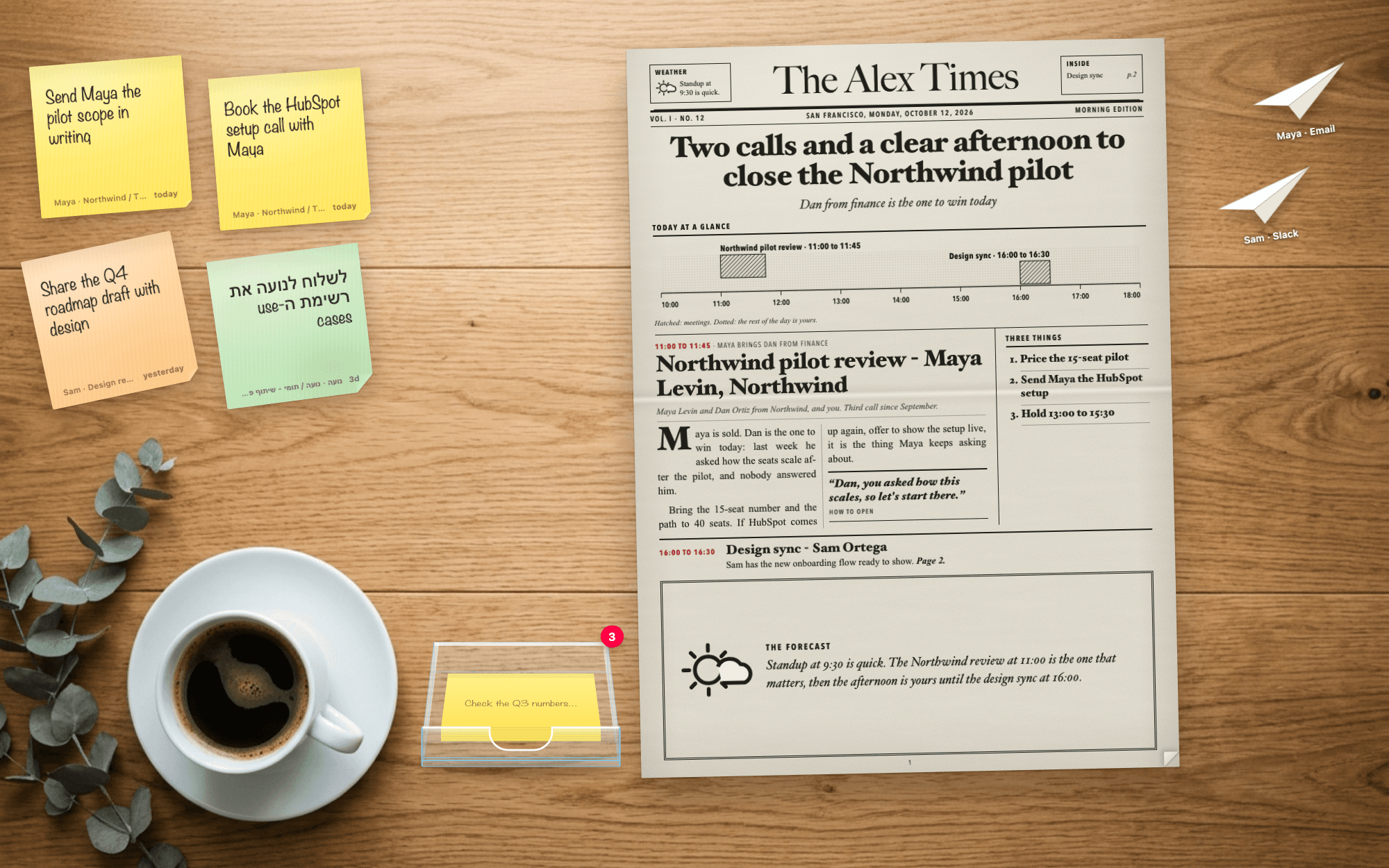
Timeless Desk
Your desktop becomes a real desk: a morning paper about your meetings, follow-ups as paper planes, tasks on sticky notes.
The prompt
Set up Timeless Desk for me. It turns my Mac desktop into a real desk: every morning a paperboy rides by and throws today's newspaper about my meetings onto it, the follow-ups I owe people land as paper planes, and the tasks I took on in meetings stick on as sticky notes. Nothing is ever sent unless I press Send. Work through these steps in order.

1. Check Timeless first
Run `timeless version --json`. If `timeless` is not on your PATH, try /Applications/Timeless.app/Contents/Resources/timeless-cli/timeless (or the same path under ~/Applications). Then run `timeless status --json`.
- If both work and status shows "authenticated": true, tell me in one line that Timeless is already installed and connected, then go straight to step 2. Do not run the onboarding again.
- Otherwise: Set up Timeless for me. Fetch https://docs.timeless.day/cli/agent-install.md and follow those instructions exactly. When setup is done, continue with step 2.
Timeless Desk is a small native Mac app, so also check for Xcode command line tools (`xcrun swiftc --version`) and the `claude` CLI on my PATH. If something is missing, tell me the one command to fix it and stop.

2. Learn who I am, then ask me first
Everything on the desk is about me, so find out before asking: my name from the host of my own meetings (`timeless meetings list --json`, the host on most of them), falling back to my Mac account name (`id -F`); my company email domain; my time zone and likely city; which days my meetings run. Then ask everything in one short message, with what you found as the defaults, and wait for my answers:
- My first name, and the paper's name (default "The <first name> Times").
- My city for the dateline, and when the paper should arrive (default 08:30 on the days I usually have meetings; ask which days my work week runs, don't assume).
- Which meetings get paper planes (default: meetings with someone outside my company, 5 minutes or longer). Sticky notes come from every meeting of 5 minutes or longer.
- May I read my last 30 sent emails and Slack messages to learn how I write? (Only a short style guide is kept, never the messages.)
- Should Timeless Desk start when I log in? (default yes; it adds a login item I can remove anytime)
Everything personal comes from my answers and my own data: the nameplate, "Three things, <first name>", the sign-off in my drafts, my city, my work week. Never put anyone else's name or details anywhere in the app.

3. Learn my voice
If I said yes, read my recent sent messages and write a short style guide to ~/.config/timeless/voice.md: how I open, how long I write, how I sign off, which language I use with whom, phrases I use, things I never say. Show it to me and let me edit it. If I said no, write a short, direct, neutral default.

4. Build the desk
A native Mac app called Timeless Desk in ~/Projects/timeless-desk (Swift + a WKWebView page with all CSS, JS and images inlined, no network, no web fonts), data in ~/.local/share/timeless/desk.
- Window: borderless, transparent, covering the primary display (NSScreen.screens.first, never NSScreen.main), just above the desktop icons and below every app window, on every Space, no Dock icon. Refit and redraw when displays change. Clicks pass through to the desktop except over the desk's own objects (the page reports their rectangles). Disable WebKit window-occlusion detection or animations freeze.
- Motion: compute every animation up front and play it as Web Animations keyframes (transform and opacity only). Never drive motion from setTimeout or requestAnimationFrame loops.
- Silence: no sound at all, anywhere.
- Click away: a click on bare desktop puts away whatever is open (a letter folds back into its plane, the paper rolls up, a flipped sticky note turns back; Escape does the same). Those clicks never reach the page, so the app watches left clicks with a global mouse monitor and acts only when no app window, Dock or menu bar is under the pointer (window layer 0 or above in CGWindowListCopyWindowInfo).
- Background Claude runs (the plane and note writers, the Claude hand-off, the morning paper, and Send) use `claude -p` with `--permission-mode dontAsk` and an explicit `--allowedTools` list for that one job: `Bash(timeless *)`, Read, Write and Edit inside the desk's data folder, and only the read tools of the mail, Slack and calendar connectors it needs. Every send, reply, post, schedule, invite or delete tool goes in `--disallowedTools`. Only the run that follows my click on Send may use the one send tool for that channel. Never use bypassPermissions or --dangerously-skip-permissions. While setting up, don't run these background jobs yourself; let the app run them.
- Right-click on anything the desk draws opens a native menu: a "Timeless Code" header with the Timeless logo, actions for the clicked object, then Edit with AI (opens Claude Code in the project with what I clicked), Open in folder (reveals the file behind it), Pause new notes and planes / Resume, a Demo submenu, and Quit. Right-click on empty desktop still goes to Finder.
- If I said yes, start at login with a LaunchAgent (label day.timeless.desk, RunAtLoad, restart after a crash but not after Quit). Otherwise just launch it.

5. The morning paper
Add a scheduled Timeless playbook named desk_paper at my chosen time and days (read the timeless skill's guide to customizing playbooks first, leave every existing playbook exactly as it is). Its prompt reads today's calendar and each meeting's Timeless history, then writes ~/.local/share/timeless/desk/paper.json: edition (today), date_label, city, paper_name, first_name, issue number, headline (the story of the day in one line, not a meeting title), dek, story (one paragraph of 110 to 170 words that reports my whole day the way a reporter would: opens with the dateline "CITY, Weekday.", names the decision or tension the day turns on, the people, the times, what is at stake and where the open time is), theme (exactly one of numbers, deal, deep_work, people, launch, travel, calm, meetings: whichever fits the day), theme_caption (one line under the illustration), forecast (2 to 3 sentences on how the day flows), and pages (one per meeting, chronological: kicker "HH:MM to HH:MM - one fact", title, who, teaser, 1 to 3 short paragraphs of concrete prep, an opener line in my voice, clips), plus three (three things to do today, each with one line of why). It also reads anything I dropped on yesterday's paper (desk/inbox/) and clips it to the right story. Tight, concrete, no em-dashes. To meet the Timeless success contract it also writes the front page as one self-contained HTML file to {{.OutPath}}. Run `timeless playbooks validate desk_paper`.
On the desk:
- Delivery: a paperboy (flat illustration: red cap, satchel of rolled papers, red bike, pedalling legs, turning wheels) rides along the bottom of the screen and throws the paper from his hand. The roll is a real rolled newspaper: a shaded newsprint cylinder with the nameplate, the dateline (weekday, date, city, issue number) and the headline printed round it, a red rubber band and the spiral of sheets at the end. It spins about its length in the air, lands with a squash and a small bounce, rolls a little and always settles with the nameplate and date facing up. Its shadow tracks it.
- Click the roll and it unrolls into a real tabloid page, laid out exactly as in Appendix A (use that code and stylesheet as given, so every install looks the same): cream newsprint (#f1eee5) with fibres and the crease from being rolled, and near-black ink (#111) so it reads easily. Front page: nameplate in Big Caslon with a Weather ear and an "Inside" ear listing each meeting with its page, an edition line between thick and thin rules, the headline that tells the story of the day, the dek, then the reporter's story of the day in large justified type (the dateline in small caps) with, beside it, an engraved ink illustration of the day's theme and its caption, then "Today at a glance" (the day's meetings as hatched blocks on an hour rule), then "In today's paper": a teaser for every meeting with the page it runs on, next to a "Three things" sidebar. Inside pages: folio line, every meeting as a full story, two to a page (kicker, title, who, columns with a drop cap, the opener as a pull quote, clips), a house ad filling any empty space. Back page: "Three things, <first name>" with the why for each, and a letters-to-the-editor drop box (files, links or notes dropped on any page are clipped for tomorrow's edition). Hoefler Text heads, Avenir Next Condensed labels, Times body.
- Turning pages: labelled tabs in the bottom corners ("Page 2 ›", "‹ Page 1") whose paper corner curls up under the pointer; the arrow keys turn too.
- Putting it away: a "Roll up ✕ / or click the desk" tab clipped to the top edge rolls it back up, and so do Escape and any click on bare desktop. Crumple and toss from the right-click menu, or flick it off.

6. Paper planes (the follow-ups I owe)
Every 3 minutes the app runs `timeless meetings list --json --status completed --limit 10`. For each new meeting that matches my rule, wait until `timeless meetings transcript <id> --json` has segments (give up after 6 hours; on the very first run only record existing meetings, so installing never floods the desk), then run `claude -p` once to draft the follow-ups: read the meeting, the transcript and voice.md, decide who is actually owed one (zero is fine), pick email or Slack from my history with them, write in my voice and the meeting's language, concrete, never inventing a commitment or a date (a vague offer becomes a question), get "today" and "yesterday" right. One JSON file per plane.
- A plane arrives the way a real one crosses a room: thrown in fast and high across the top, it bleeds speed to drag and porpoises (slows and noses up, dips and speeds up again) as it sinks, banks through a wide C-shaped turn down the left side with its wings tilted into the turn (bank follows the turn rate, plus a little wobble), comes in on a long rising approach, flares just above the desk, touches down with a small hop, skids from its own glide speed and swings round as it settles. Height reads as size and as one soft shadow on the desk that grows further and blurrier the higher it flies (no drop shadow on the plane itself). Each plane gets its own variation of the route from a well-mixed hash of its id, so no two fly alike. The whole flight is computed up front and played as one Web Animations keyframe set, about 5 seconds. Planes never land on top of each other.
- Click one and it unfolds (CSS 3D folds, paper texture, crease lines) into the letter: who it is to, why, a Timeless source chip linking to the meeting, then an editable subject and body, with Done, Later and Send. Send folds it back up and it flies off; only then does the app send the exact text through the Gmail or Slack connector, via `claude -p`.
- Every other flight uses the same physics, as one shared glide: when a letter folds back up (Later, or a click on the desk) the plane turns gradually from its resting angle into its direction of travel, lifts off a little larger with its shadow sliding out from under it, arcs to a free spot, flares and settles back to its resting angle; Done throws it off the desk; Send climbs it away accelerating off the screen (click it mid-flight to catch it, and nothing is sent); a failed send boomerangs back.
- Meeting links: https://my.timeless.day/m/ + base64 (no padding) of the meeting's space id followed by the host's user id. The CLI's mtg_ id is not the space id: get the space from GET https://my.timeless.day/api/v1/spaces/meeting/?include=owned (then shared), signed in with the CLI's token file (~/.config/timeless/token-*.json, newest expiry), matching primary_conversation_uuid. The app reads the token at runtime; never print it or copy it anywhere.

7. Sticky notes (the tasks I took on)
After every meeting of 5 minutes or longer, a strict `claude -p` note writer reads the transcript: a task counts only if I personally said I would do it or accepted a direct request, it has a result someone could check, and it was not finished in the meeting. At most 3 notes per meeting (priority 3: someone outside is waiting, a date was said, or it blocks someone), any extra real tasks go to a pile, a follow-up already covered by a paper plane is not a note, and tasks like ones I marked "Not mine" are skipped. If a later transcript shows a note was done, it marks it done.
- Notes slap onto the desk in a handwriting font (Noteworthy), slightly crooked, notes from the same meeting sharing a colour, mostly classic yellow. They yellow, curl and droop as they age, and ruffle when the cursor whips past. At most 6 on the desk at once; the rest wait in a clear acrylic sticky-note holder bottom-left with a counter, which disappears when empty. Click the holder to peel the next one off.
- Click a note to flip it: the exact quote from the meeting, the due date, a Timeless source chip, and Done, Tomorrow, Not mine. Drag a note and a tray slides up: Claude, then the teammates from that meeting, then a bin. Drop on the bin and it crumples into a ball that drops in. Drop on the holder to put it back on the pile. Drop on a teammate and it folds into a paper plane addressed to them, drafted in my voice for me to send. Drop on Claude and Claude works the task in the background (it may read mail, Slack and the calendar, but every tool that sends, posts, schedules, invites or changes another system is denied with --disallowedTools), writes its output as files and reports back on the note with a stamp.
- When a later meeting shows a note was done, it peels itself off and drifts away like a leaf.

8. Start it and show me
Build it, install it to ~/Applications/Timeless Desk.app, load the LaunchAgent if I said yes, and run the paperboy delivery once with a sample paper built from my real calendar. Add demo.sh for product demos and screen recordings, everything made up: colleagues at example.com and a fictional customer, marked "demo": true, signed with my first name; Send on a demo plane plays the fly-off and sends nothing. Modes: `show`, `notes`, `planes`, `all`, `clear`. `show` is the product demo in one command: it starts the desk if it was quit, clears the desk (my real planes and notes are parked, today's real paper is set aside), then about 3 seconds later six sticky notes slap on one by one (one from a later meeting peels itself off), 5 seconds after the last note three paper planes fly in 1.5 seconds apart, and once they have landed the paperboy rides by and throws a made-up paper ("The <first name> Times", the same layout with a story, a theme illustration and three meetings). `clear` removes every demo item and brings my real desk back exactly as it was. Put the same show in the right-click menu: Demo ▸ Product demo, plus Newspaper delivery, Sticky notes, Paper planes, and Clear the demo.
Never open, play or send anything on my computer except when I click. Finish with three lines: where things will appear, how to run the product demo (`demo.sh show`, then `demo.sh clear`), and how to stop Timeless Desk (`launchctl bootout gui/$(id -u)/day.timeless.desk`).

Appendix A. The newspaper page, exactly
Page code (el(tag, class, html) makes an element, esc() escapes HTML, SUN is a 38x30 line-drawn sun-and-cloud SVG; p is paper.json; pg is one of pagesOf(p); ix and n are the page number and count):
// Front page tells the story of the day; every meeting runs inside, two to a page; the back page is the to-do.
function pagesOf(p) {
  const pages = [{ kind: "front" }], rest = (p.pages || []).map((_, i) => i);
  for (let i = 0; i < rest.length; i += 2) pages.push({ kind: "inside", stories: rest.slice(i, i + 2) });
  pages.push({ kind: "back" });
  return pages;
}
// ---------- the newspaper itself ----------
const short = (t, n) => { t = String(t || ""); return t.length > n ? t.slice(0, n - 1).trimEnd() + "…" : t; };
const firstSentence = (t) => { const m = String(t || "").match(/^.*?[.!?](\s|$)/); return (m ? m[0] : String(t || "")).trim(); };
const paras = (list) => (list || []).map((t) => `<p dir="auto">${esc(t)}</p>`).join("");
const span = (k) => { const m = String(k || "").match(/(\d{1,2}):(\d{2})\s*(?:to|-|–)\s*(\d{1,2}):(\d{2})/); return m ? [+m[1] + m[2] / 60, +m[3] + m[4] / 60] : null; };
const kickWhen = (k) => String(k || "").split(/\s+-\s+/)[0];
const kickWhat = (k) => String(k || "").split(/\s+-\s+/).slice(1).join(" - ");
const housePg = (n) => `p.${n}`;

// "Today at a glance": the day's meetings as a printed chart, hatched blocks on an hour rule.
function glance(p) {
  const items = (p.pages || []).map((s) => ({ s, t: span(s.kicker) })).filter((x) => x.t);
  if (!items.length) return "";
  const lo = Math.max(7, Math.floor(Math.min(...items.map((x) => x.t[0]))) - 1), hi = Math.min(21, Math.ceil(Math.max(...items.map((x) => x.t[1]))) + 1);
  const w = 560, x0 = 8, x1 = w - 8, X = (h) => x0 + (h - lo) / (hi - lo) * (x1 - x0);
  let ticks = "";
  for (let h = lo; h <= hi; h++) ticks += `<line x1="${X(h)}" y1="58" x2="${X(h)}" y2="63" stroke="#1f1d1a" stroke-width=".8"/><text x="${X(h)}" y="74" text-anchor="${h === lo ? "start" : h === hi ? "end" : "middle"}">${h}:00</text>`;
  const blocks = items.map(({ s, t }, i) => `<rect x="${X(t[0])}" y="${i % 2 ? 30 : 16}" width="${Math.max(3, X(t[1]) - X(t[0]))}" height="26" fill="url(#hatch)" stroke="#1f1d1a" stroke-width=".9"/>
    <text x="${X(t[0]) > w * .55 ? X(t[1]) : X(t[0])}" text-anchor="${X(t[0]) > w * .55 ? "end" : "start"}" y="${i % 2 ? 26 : 12}" class="lbl">${esc(short(s.title.split(/\s+-\s+/)[0], 30))} \u00b7 ${esc(kickWhen(s.kicker))}</text>`).join("");
  return `<figure class="np-chart"><figcaption>Today at a glance</figcaption><svg viewBox="0 0 ${w} 78" width="100%" height="84">
    <defs><pattern id="hatch" width="3.2" height="3.2" patternUnits="userSpaceOnUse" patternTransform="rotate(45)"><rect width="3.2" height="3.2" fill="#d9d4c6"/><line x1="0" y1="0" x2="0" y2="3.2" stroke="#1f1d1a" stroke-width="1.1"/></pattern>
    <pattern id="dots" width="3" height="3" patternUnits="userSpaceOnUse"><circle cx="1.5" cy="1.5" r=".55" fill="#1f1d1a"/></pattern></defs>
    <rect x="${x0}" y="16" width="${x1 - x0}" height="40" fill="url(#dots)" opacity=".18"/>
    <line x1="${x0}" y1="58" x2="${x1}" y2="58" stroke="#1f1d1a" stroke-width="1.2"/>${ticks}${blocks}</svg>
    <p class="np-cap">Hatched: meetings. Dotted: the rest of the day is yours.</p></figure>`;
}
// A half-page house ad when a page has the room (one story inside), a strip ad otherwise.
const houseAdBig = `<div class="np-ad big"><small>Advertisement</small>
  <svg class="np-ad-art" viewBox="0 0 90 160" width="54" height="96"><defs><pattern id="adDots" width="4" height="4" patternUnits="userSpaceOnUse"><circle cx="2" cy="2" r="1.45" fill="#1f1d1a"/></pattern></defs>
    <rect width="90" height="70" fill="url(#adDots)"/><rect y="90" width="90" height="70" fill="url(#adDots)"/></svg>
  <b>Never take notes again.</b><span>Every meeting, remembered. The recap, the follow-up, the sticky note, even this paper: written for you before you ask.</span>
  <em>timeless</em><i>timeless.day</i></div>`;
// The day's theme as a newspaper cut: ink line art with hatching and dots. The morning paper picks one.
const ILLUS_DEFS = `<defs><pattern id="ih" width="3" height="3" patternUnits="userSpaceOnUse" patternTransform="rotate(45)"><rect width="3" height="3" fill="#f1eee5"/><line x1="0" y1="0" x2="0" y2="3" stroke="#151412" stroke-width=".9"/></pattern><pattern id="ix" width="3.4" height="3.4" patternUnits="userSpaceOnUse"><rect width="3.4" height="3.4" fill="#f1eee5"/><path d="M0 0L3.4 3.4M3.4 0L0 3.4" stroke="#151412" stroke-width=".7"/></pattern><pattern id="id" width="3" height="3" patternUnits="userSpaceOnUse"><rect width="3" height="3" fill="#f1eee5"/><circle cx="1.5" cy="1.5" r=".75" fill="#151412"/></pattern></defs>`;
const ILLUS = { numbers, deal, deep_work, people, launch, travel, calm, meetings }; // one 180x150 SVG fragment each, see below
const houseAd = `<div class="np-ad"><div><small>Advertisement</small><b>Never take notes again.</b><span>Every meeting, remembered. Recaps, follow-ups and this paper, written for you.</span></div>
  <div class="np-ad-mark"><svg width="18" height="30" viewBox="0 0 9 16"><rect width="9" height="7" fill="#1f1d1a"/><rect y="9" width="9" height="7" fill="#1f1d1a"/></svg><em>timeless</em></div></div>`;
const folio = (p, n) => `<div class="np-folio grab"><span>${n}</span><span>${esc(p.paper_name || "The Morning Paper")}</span><span>${esc(p.date_label || p.edition)}</span></div>`;
function story(p, i, big) {
  const s = p.pages[i] || {};
  return `<article class="np-story${big ? " big" : ""}"><p class="np-kick"><b>${esc(kickWhen(s.kicker))}</b>${kickWhat(s.kicker) ? " · " + esc(kickWhat(s.kicker)) : ""}</p>
    <h3 dir="auto">${esc(s.title)}</h3><p class="np-by" dir="auto">${esc(s.who || "")}</p>
    <div class="np-body">${paras(s.body)}${s.opener ? `<blockquote dir="auto">“${esc(s.opener)}”<small>How to open</small></blockquote>` : ""}</div>
    ${(s.clips || []).map((c) => `<p class="np-clip">Clipped: ${esc(c)}</p>`).join("")}</article>`;
}

function pageHTML(p, pg, ix, n) {
  const page = el("div", "page np");
  const stories = p.pages || [];
  if (pg.kind === "front") {
    const lead = stories[0], second = stories[1];
    const inside = stories.map((s, i) => `<li><span dir="auto">${esc(short(s.title.split(/\s+-\s+/)[0], 26))}</span><i>${housePg(2 + Math.floor(i / 2))}</i></li>`).join("");
    const teasers = stories.map((s, i) => `<div class="np-teaser"><p class="np-kick"><b>${esc(kickWhen(s.kicker))}</b>${kickWhat(s.kicker) ? " \u00b7 " + esc(kickWhat(s.kicker)) : ""}</p>
      <h5 dir="auto">${esc(s.title)}</h5><p dir="auto">${esc(s.teaser || "")} <i>Page ${2 + Math.floor(i / 2)}.</i></p></div>`).join("");
    const three = (p.three || []).map((t) => `<li dir="auto">${esc(t.do)}</li>`).join("");
    page.innerHTML = `
      <header class="np-head grab">
        <div class="ear"><b>Weather</b><div class="ear-row">${SUN}<span dir="auto">${esc(short(firstSentence(p.forecast), 92))}</span></div></div>
        <h1 class="np-name">${esc(p.paper_name || "The Morning Paper")}</h1>
        <div class="ear r"><b>Inside</b><ul>${inside || "<li><span>Three things for today</span><i>back</i></li>"}</ul></div>
      </header>
      <div class="np-line"><span>Vol. I · No. ${esc(p.issue || 1)}</span><span>${esc((p.city ? p.city + ", " : "") + (p.date_label || p.edition))}</span><span>Morning edition</span></div>
      <h2 class="np-hed" dir="auto">${esc(p.headline)}</h2>
      ${p.dek ? `<p class="np-dek" dir="auto">${esc(p.dek)}</p>` : ""}
      <div class="np-lede-row">
        <div class="np-lede" dir="auto"><p>${p.story ? esc(p.story).replace(/^([^.]{2,40}\.)\s/, "<b>$1</b> ") : esc(p.forecast || "")}</p></div>
        <figure class="np-illus"><svg viewBox="0 0 180 150">${ILLUS_DEFS}${ILLUS[p.theme] || ILLUS.meetings}</svg><figcaption dir="auto">${esc(p.theme_caption || "")}</figcaption></figure>
      </div>
      ${glance(p)}
      <div class="np-front">
        <div class="np-main"><h4 class="np-boxhead">In today's paper</h4>${teasers || `<p class="np-cap">No meetings today. The day is yours.</p>`}</div>
        <aside class="np-side"><h4>Three things</h4><ol>${three}</ol></aside>
      </div>`;
  } else if (pg.kind === "inside") {
    page.innerHTML = folio(p, ix + 1) + `<div class="np-section">Today's meetings</div>` + pg.stories.map((i) => story(p, i, pg.stories.length === 1)).join("") + (pg.stories.length === 1 ? houseAdBig : houseAd);
  } else {
    const three = (p.three || []).map((t) => `<li><b dir="auto">${esc(t.do)}</b><span dir="auto">${esc(t.why || "")}</span></li>`).join("");
    page.innerHTML = folio(p, ix + 1) + `<div class="np-section">Win the day</div>
      <h2 class="np-hed">Three things, ${esc(p.first_name || "")}</h2><ol class="np-three">${three}</ol>
      <div class="letters" data-letters="1"><b>Letters to the editor</b>Drop a file, a link or a note on any page. Drop it on a meeting's story to clip it there. Tomorrow's edition reads it.</div>` + houseAdBig;
  }
  // Turn the page from its corners: they curl up under the pointer.
  const corners = (ix > 0 ? `<button class="np-turn prev" data-go="-1" aria-label="Previous page"><span>\u2039 Page ${ix}</span></button>` : "") +
    (ix < n - 1 ? `<button class="np-turn next" data-go="1" aria-label="Next page"><span>Page ${ix + 2} \u203a</span></button>` : "");
  page.insertAdjacentHTML("beforeend", corners + `<div class="np-pageno">${ix + 1}</div>`);
  return page;
}
// In openPaper, after the #paper element is created:
const shut = el("button", "np-close", `<b>Roll up \u2715</b><i>or click the desk</i>`); shut.setAttribute("aria-label", "Roll up the paper");
shut.onclick = (ev) => { ev.stopPropagation(); closePaper("roll"); }; paperEl.appendChild(shut);
// Escape and a click on bare desktop also call closePaper("roll"); the arrow keys call turn(±1).
ILLUS: each theme is a newspaper cut in ink line art (stroke #151412, width 2, round caps and joins, fills from ILLUS_DEFS: #ih hatching, #ix cross-hatching, #id dots, or #fbf9f3 paper), drawn in a 180x150 box. numbers: a ledger sheet with ruled lines, five hatched bars, a rising line with an arrow head, a stack of coins and a pencil. deal: a contract with a folded corner, text lines, a signature over a rule, and a fountain pen. deep_work: a desk lamp on a hatched base, its shade throwing a dotted light cone onto an open book. people: three busts (hatched, cross-hatched, dotted) with a speech bubble above. launch: a rocket with a cross-hatched porthole, hatched fins and flame, dotted smoke clouds and spark marks. travel: a hatched suitcase with two straps and wheels, an airliner above it. calm: a dotted half sun on the horizon with rays, ripples below, a cup of tea. meetings: a calendar page with a hatched header, rings, a grid with two cross-hatched slots, and a clock face.
Stylesheet (NOISE stands for two inline SVG feTurbulence textures at low alpha: fine grain, and long horizontal fibres):
#paper{width:620px;height:840px;perspective:2400px;cursor:default} #paper .sheet{position:absolute;inset:0;color:#111;background-color:#f1eee5;overflow:hidden;border-radius:1px;box-shadow:0 1px 2px rgba(30,20,10,.25),0 26px 44px rgba(30,20,10,.34);background-image:linear-gradient(180deg,transparent 46.5%,rgba(60,45,20,.07) 47.6%,rgba(255,255,255,.38) 48.1%,rgba(60,45,20,.05) 48.7%,transparent 50%),radial-gradient(120% 70% at 35% 0%,rgba(255,253,245,.45),transparent 60%),linear-gradient(90deg,rgba(70,55,30,.08),transparent 7%,transparent 93%,rgba(70,55,30,.1)),linear-gradient(180deg,rgba(70,55,30,.05),transparent 8%,transparent 92%,rgba(70,55,30,.08)),NOISE,NOISE;transform-origin:0 50%;backface-visibility:hidden} #paper .sheet.turning{transition:transform .7s cubic-bezier(.45,.05,.3,1),box-shadow .7s;z-index:3} #paper .sheet.unroll{animation:unroll .9s cubic-bezier(.2,.8,.2,1) both;transform-origin:50% 0} @keyframes unroll{0%{clip-path:inset(0 0 91% 0);transform:rotateX(-35deg)} 100%{clip-path:inset(0 0 0 0);transform:none} } #paper .sheet.roll-up{animation:rollup .5s ease-in both;transform-origin:50% 0} @keyframes rollup{to{clip-path:inset(0 0 92% 0);transform:rotateX(-40deg);opacity:.4} } #paper .sheet.crumple{animation:crumple .55s cubic-bezier(.5,0,.8,.4) both;transform-origin:50% 50%} @keyframes crumple{40%{transform:scale(.7) rotate(8deg) skew(6deg,-4deg);border-radius:30%} 100%{transform:scale(.12) rotate(40deg);border-radius:50%;opacity:.6} } .grab{cursor:grab} .np{position:absolute;inset:0;padding:18px 26px 20px;display:flex;flex-direction:column;overflow:hidden;--head:"Hoefler Text","Big Caslon",Georgia,serif;--label:"Avenir Next Condensed","Helvetica Neue",Arial,sans-serif;--body:"Times New Roman",Times,serif;text-shadow:0 0 .25px rgba(17,17,17,.45);-webkit-font-smoothing:antialiased;color:#111} .np p{margin:0} .np-head{display:grid;grid-template-columns:94px 1fr 94px;align-items:center;gap:10px;padding-bottom:4px} .np-name{margin:0;text-align:center;font:500 44px/1 "Big Caslon","Didot",serif;letter-spacing:-.5px;white-space:nowrap} .ear{border:1px solid #1f1d1a;padding:5px 6px;font:400 8.5px/1.25 var(--body);align-self:stretch} .ear b{display:block;font:700 8px/1 var(--label);letter-spacing:.12em;text-transform:uppercase;margin-bottom:4px} .ear-row{display:flex;gap:4px;align-items:flex-start} .ear-row svg{flex:none;width:24px;height:19px} .ear ul{margin:0;padding:0;list-style:none} .ear li{display:flex;justify-content:space-between;gap:4px} .ear li span{overflow:hidden;text-overflow:ellipsis;white-space:nowrap} .ear li i{font-style:italic;flex:none} .np-line{display:flex;justify-content:space-between;font:600 8.5px/1 var(--label);letter-spacing:.14em;text-transform:uppercase;border-top:3px solid #1f1d1a;border-bottom:1px solid #1f1d1a;box-shadow:0 -5px 0 -4px #1f1d1a;padding:4px 0;margin:4px 0 10px} .np-hed{margin:0;font:800 34px/1.02 var(--head);letter-spacing:-.6px;text-align:center} .np-dek{font:italic 400 15px/1.3 var(--head);text-align:center;color:#2a2722;margin:5px 0 8px !important} .np-front{display:grid;grid-template-columns:1fr 176px;gap:0;border-top:1px solid #1f1d1a;flex:0 0 auto} .np-main{padding:8px 12px 0 0;border-right:1px solid #1f1d1a;min-width:0;overflow:hidden} .np-side{padding:8px 0 0 12px;min-width:0;overflow:hidden} .np-side h4{margin:0 0 4px;font:700 9px/1 var(--label);letter-spacing:.14em;text-transform:uppercase;border-bottom:2px solid #1f1d1a;padding-bottom:4px} .np-side ol{margin:0 0 10px;padding:0 0 0 16px;font:700 12px/1.25 var(--head)} .np-side li{padding:4px 0;border-bottom:1px solid rgba(17,17,17,.45)} .np-chart{margin:0 0 8px;flex:none} .np-chart figcaption{font:700 9px/1 var(--label);letter-spacing:.14em;text-transform:uppercase;border-bottom:2px solid #1f1d1a;padding-bottom:4px;margin-bottom:4px} .np-chart text{font:600 8.5px var(--label);fill:#1f1d1a} .np-chart .lbl{font:700 9.5px var(--label);letter-spacing:.02em} .np-cap{font:italic 400 8.5px/1.25 var(--body);color:#33302a;margin-top:2px !important} .np-kick{font:400 8.5px/1.3 var(--label);letter-spacing:.1em;text-transform:uppercase;color:#33302a;margin-bottom:3px !important} .np-kick b{color:#9e0b24;font-weight:700} .np-story h3{margin:0 0 3px;font:700 20px/1.08 var(--head);letter-spacing:-.3px} .np-story.big h3{font-size:26px} .np-by{font:italic 400 10px/1.3 var(--body);color:#33302a;margin-bottom:6px !important;padding-bottom:5px;border-bottom:1px solid rgba(17,17,17,.45)} .np-body{column-count:2;column-gap:14px;column-rule:1px solid rgba(17,17,17,.45);font:400 12.5px/1.4 var(--body);text-align:justify;-webkit-hyphens:auto;hyphens:auto} .np-story.big .np-body{font-size:12.5px} .np-body p{margin:0 0 6px;text-indent:1em} .np-body p:first-child{text-indent:0} .np-body p:first-child::first-letter{float:left;font:700 38px/.82 var(--head);padding:3px 4px 0 0} .np-body blockquote{break-inside:avoid;margin:6px 0 8px;padding:6px 0;border-top:2px solid #1f1d1a;border-bottom:1px solid #1f1d1a;font:italic 700 13px/1.25 var(--head);text-align:left} .np-body blockquote small{display:block;margin-top:4px;font:600 7.5px/1 var(--label);font-style:normal;letter-spacing:.14em;text-transform:uppercase;color:#33302a} .np-clip{font:700 9px/1.3 var(--label);letter-spacing:.06em;text-transform:uppercase;color:#9e0b24;margin-top:4px !important} .np-tease{border-top:2px solid #1f1d1a;margin-top:8px;padding-top:6px;display:grid;grid-template-columns:auto 1fr;column-gap:12px;align-items:baseline} .np-tease .np-kick{grid-row:span 2} .np-tease h4{margin:0;font:700 15px/1.1 var(--head)} .np-tease p:last-child{font:400 11px/1.3 var(--body);grid-column:2} .np-tease i{font-weight:700} .np-close{position:absolute;top:-13px;right:18px;z-index:6;display:flex;align-items:center;gap:8px;padding:5px 9px;border:1px solid #111;background:#fbf9f3;box-shadow:0 3px 8px rgba(30,20,10,.25);cursor:pointer;transform:rotate(1.2deg);transition:transform .18s ease} .np-close b{font:700 10px/1 "Avenir Next Condensed","Helvetica Neue",sans-serif;letter-spacing:.14em;text-transform:uppercase;color:#111} .np-close i{font:italic 400 10px/1 "Times New Roman",serif;color:#4a463d} .np-close:hover{transform:rotate(0) translateY(-2px)} .np-close:hover b{color:#9e0b24} .np-lede-row{display:grid;grid-template-columns:1fr 172px;gap:14px;border-top:1px solid #111;padding:9px 0 10px;margin-top:6px} .np-lede p{margin:0;font:400 14.5px/1.45 var(--body);text-align:justify;-webkit-hyphens:auto;hyphens:auto} .np-lede b{font:700 11px/1 var(--label);letter-spacing:.12em;text-transform:uppercase} .np-boxhead{margin:0 0 2px;font:700 9px/1 var(--label);letter-spacing:.14em;text-transform:uppercase;border-bottom:2px solid #111;padding-bottom:4px} .np-teaser{padding:7px 0 8px;border-bottom:1px solid rgba(17,17,17,.45)} .np-teaser h5{margin:0 0 3px;font:700 16px/1.12 var(--head);letter-spacing:-.2px} .np-teaser p:last-child{font:400 12.5px/1.38 var(--body)} .np-teaser i{font-weight:700;font-style:italic} .np-illus{margin:0;border:1px solid #111;padding:6px;background:#fbf9f3;align-self:start} .np-illus svg{display:block;width:100%;height:auto} .np-illus figcaption{margin-top:5px;font:italic 400 10.5px/1.3 var(--body);color:#2a2722;border-top:1px solid rgba(17,17,17,.45);padding-top:4px} .np-forecast{margin-top:10px;flex:1 0 auto;border:3px double #1f1d1a;display:flex;align-items:center;gap:16px;padding:12px 18px} .np-fc-art svg{width:84px;height:66px;display:block} .np-forecast b{display:block;font:700 10px/1 var(--label);letter-spacing:.16em;text-transform:uppercase;margin-bottom:6px} .np-forecast span{display:block;font:italic 400 15px/1.38 var(--head)} .np-folio{display:flex;justify-content:space-between;font:600 8.5px/1 var(--label);letter-spacing:.14em;text-transform:uppercase;border-bottom:1px solid #1f1d1a;padding-bottom:5px} .np-section{font:700 11px/1 var(--label);letter-spacing:.2em;text-transform:uppercase;text-align:center;border-bottom:3px solid #1f1d1a;padding:10px 0 6px;margin-bottom:10px} .np .np-story + .np-story{border-top:2px solid #1f1d1a;margin-top:12px;padding-top:10px} .np-three{margin:10px 0;padding:0;list-style:none;counter-reset:n} .np-three li{counter-increment:n;display:grid;grid-template-columns:44px 1fr;column-gap:10px;padding:10px 0;border-bottom:1px solid rgba(17,17,17,.45);font:400 12.5px/1.4 var(--body)} .np-three li::before{content:counter(n);grid-row:span 2;font:500 44px/1 "Big Caslon",serif;color:#9e0b24} .np-three b{font:700 16px/1.2 var(--head)} .np .letters{margin-top:12px;border:1.5px dashed rgba(31,29,26,.5);border-radius:2px;padding:10px 12px;font:400 11.5px/1.4 var(--body);color:#33302a} .np .letters b{display:block;color:#1f1d1a;font:700 9px/1.4 var(--label);letter-spacing:.14em;text-transform:uppercase;margin-bottom:2px} .np-ad{margin-top:14px;flex:1 0 auto;min-height:120px;border:3px double #1f1d1a;display:flex;align-items:center;justify-content:space-between;gap:18px;padding:16px 22px;background-image:radial-gradient(rgba(31,29,26,.13) .8px,transparent 1px);background-size:4px 4px} .np-ad>div:first-child{min-width:0} .np-ad small{display:block;font:600 7.5px/1 var(--label);letter-spacing:.16em;text-transform:uppercase;color:#4a463d;margin-bottom:6px} .np-ad b{display:block;font:800 32px/1.02 var(--head);letter-spacing:-.5px;max-width:300px} .np-ad span{display:block;font:italic 400 13px/1.35 var(--body);margin-top:8px;max-width:300px} .np-ad-mark{display:flex;align-items:center;gap:8px;flex:none;background:#e9e5d8;padding:8px 10px} .np-ad-mark svg{width:26px;height:46px} .np-ad-mark em{font:700 32px/1 var(--label);font-style:normal;letter-spacing:-.5px} .np-ad.big{flex-direction:column;justify-content:center;text-align:center;gap:10px;padding:18px 40px} .np-ad.big small{margin:0} .np-ad.big b{font-size:44px;max-width:420px;letter-spacing:-1px} .np-ad.big span{font-size:14px;max-width:380px;margin:0} .np-ad.big em{font:700 30px/1 var(--label);font-style:normal;letter-spacing:-.5px} .np-ad.big i{font:600 9px/1 var(--label);font-style:normal;letter-spacing:.16em;text-transform:uppercase;color:#4a463d} .np-ad-art{display:block} .np-pageno{position:absolute;bottom:7px;left:0;right:0;text-align:center;font:600 8px/1 var(--label);letter-spacing:.12em;color:#4a463d} .np-turn{position:absolute;bottom:0;height:44px;min-width:110px;border:0;padding:0;background:transparent;cursor:pointer;z-index:5} .np-turn span{position:absolute;bottom:12px;font:700 10px/1 var(--label);letter-spacing:.14em;text-transform:uppercase;color:#111;background:#f1eee5;padding:5px 7px;border:1px solid #111;transition:transform .2s ease;white-space:nowrap} .np-turn::before{content:"";position:absolute;bottom:0;width:30px;height:30px;transition:width .22s ease,height .22s ease;background:linear-gradient(135deg,#fbf9f3 0%,#dcd6c6 46%,rgba(0,0,0,.28) 50%,transparent 56%);box-shadow:-3px -3px 6px rgba(30,20,10,.22)} .np-turn.next{right:0} .np-turn.next::before{right:0} .np-turn.next span{right:38px} .np-turn.prev{left:0} .np-turn.prev::before{left:0;background:linear-gradient(225deg,#fbf9f3 0%,#dcd6c6 46%,rgba(0,0,0,.28) 50%,transparent 56%);box-shadow:3px -3px 6px rgba(30,20,10,.22)} .np-turn.prev span{left:38px} .np-turn:hover::before{width:52px;height:52px} .np-turn.next:hover span{transform:translateX(-12px)} .np-turn.prev:hover span{transform:translateX(12px)} [dir="rtl"]{text-align:right}